Guided tour of the partner dashboard
Get an at-a-glance view of your offers, events and rewards activity on Casabee.
The partner dashboard is your central control panel. It brings together all the useful information to manage your presence on Casabee. You access it from /partners/dashboard.
Health banner
At the top of the page, a banner alerts you if anything deserves your attention: incomplete profile, missing cover image on an event, disconnected Instagram integration, quota almost reached… Handle these alerts as a priority, they directly impact your visibility.
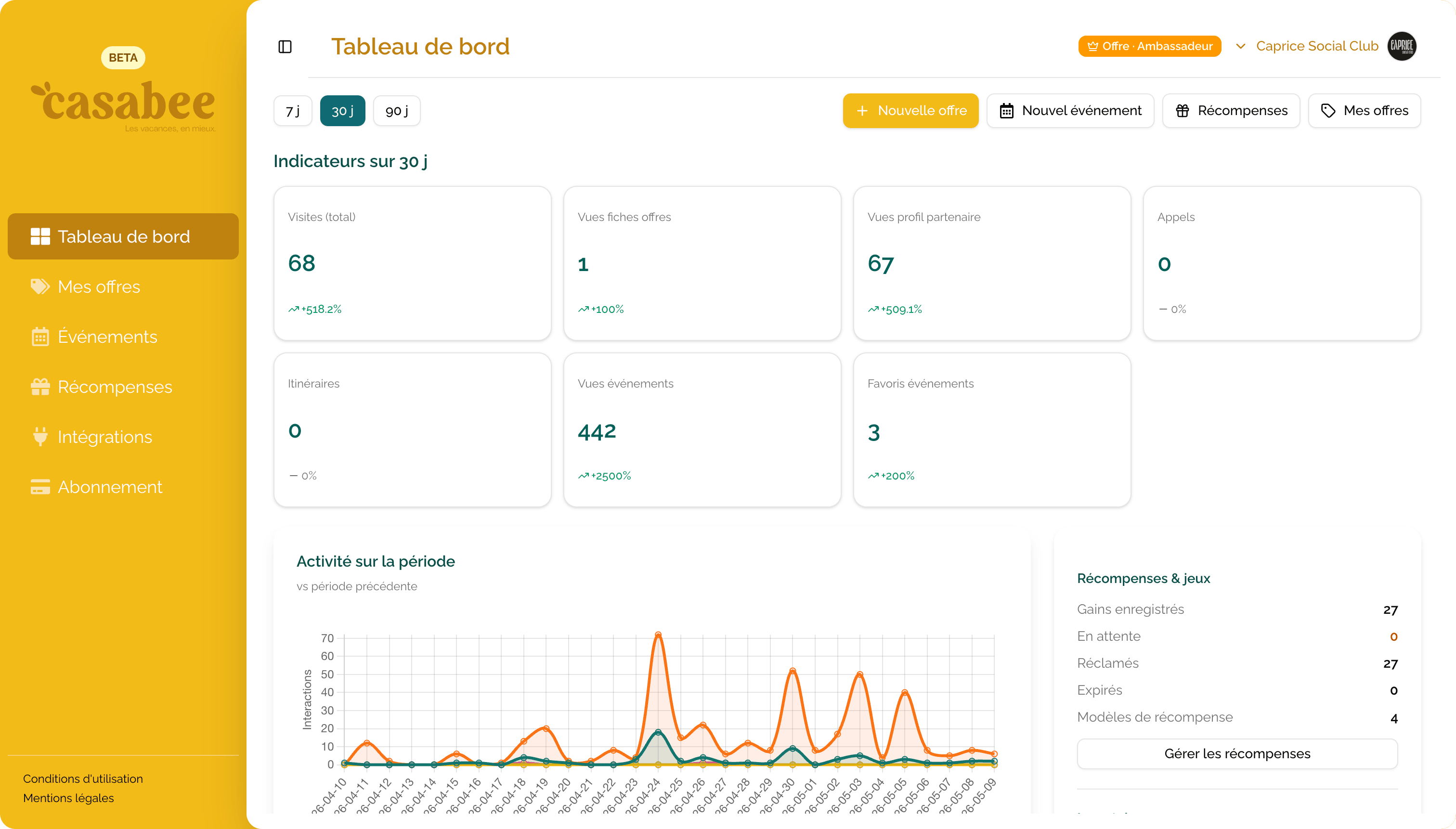
KPI widgets
Six indicators give you the pulse of your activity, with a delta compared to the previous period (green if up, red if down):
Total visits
Number of times your profile or content was loaded.
Offer detail views
How many guests opened the detail of one of your offers.
Profile views
Unique visitors who landed on your partner page.
Email clicks
Guests who contacted you directly from your page.
Event views
Event detail displays in guidebooks and BeeHive.
Event favorites
Events added to favorites by guests.
Period selection
Three ranges are available via the buttons in the top right of the widgets:
- 7 days — tactical view to track an ongoing promotion.
- 30 days — the default period, a good balance between trend and reactivity.
- 90 days — strategic view to spot seasonal trends.
Top offers and top events
Below the KPIs, two lists display your 10 best-performing pieces of content for the chosen period. Click on a line to open the corresponding page and identify what works best: catchy title, beautiful image, aggressive discount…
Rewards summary
A dedicated card summarizes the scratch game activity:
- Total wins — rewards earned by guests.
- Pending — wins not yet claimed in store.
- Claimed — wins validated on site (your real traffic indicator).
- Expired — wins not used within the deadlines.
To understand these statuses in detail: Understanding the scratch game.
Advanced statistics
On the Essential plan, some advanced statistics (segmentation by host, traffic sources, peak hours…) are locked. Upgrade to the Connected plan to unlock them and refine your steering.
To compare plans in detail: Plans and subscription changes.