Plans and subscription changes
Compare the Essential, Connected and Ambassador plans, and learn how to upgrade or cancel.
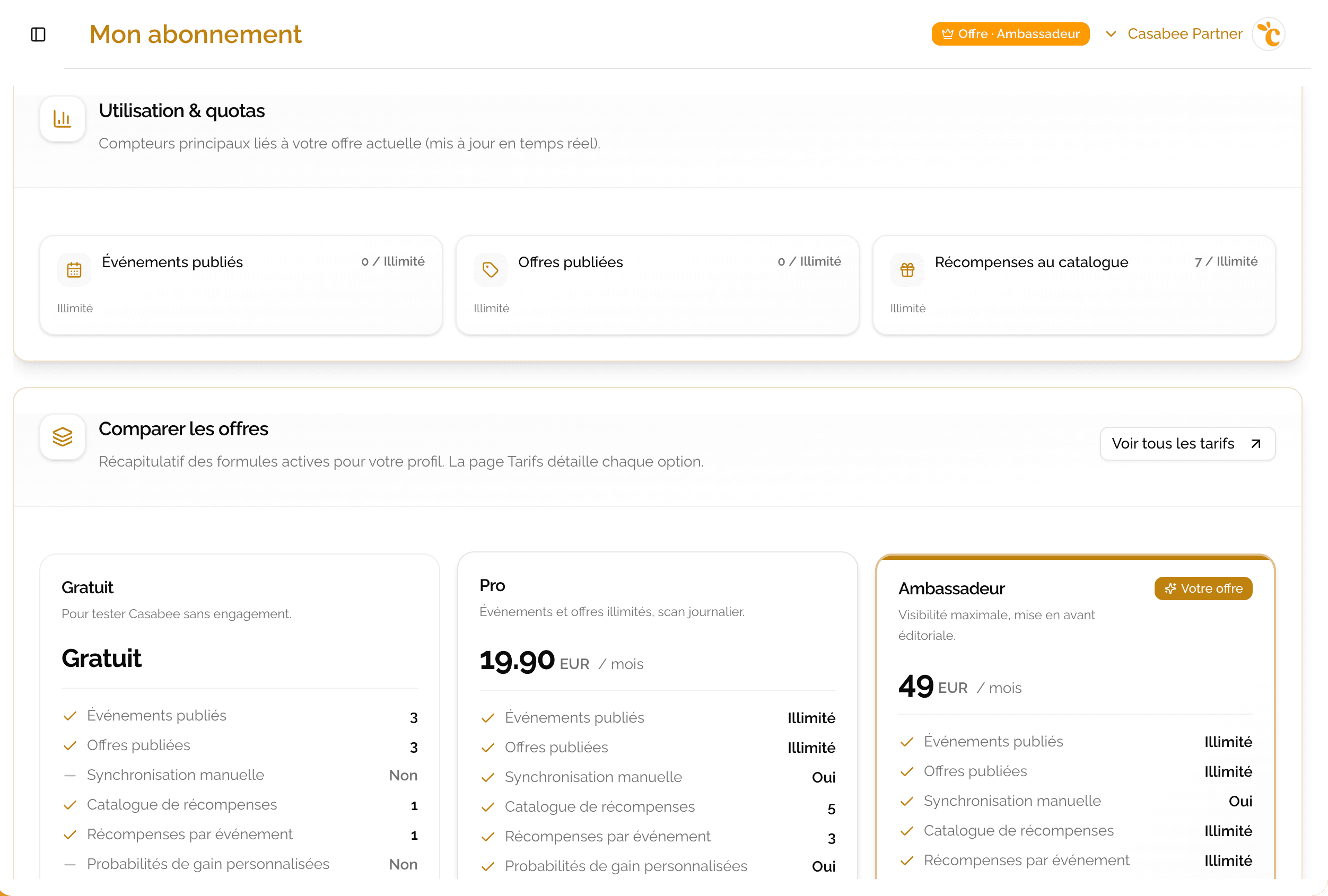
Casabee offers three plans to fit your size and ambitions: Essential (free), Connected (paid) and Ambassador (premium). You can change plans at any time from /partners/subscriptions.
Comparison table
| Feature | Essential | Connected | Ambassador |
|---|---|---|---|
| Price | Free | Monthly paid | Premium |
| Active offers | 3 | Unlimited | Unlimited |
| Active events | 3 | Unlimited | Unlimited |
| Rewards (templates) | 1 | 5 | Unlimited |
| Loyalty card | No | Yes | Yes |
| Higher placement in the app's event selections | No | Yes | Yes |
| Instagram scan | Weekly | Daily | Several times/day |
| Advanced statistics | No | Yes | Yes |
| Editorial badge | No | No | Yes |
| Support | Standard | Standard | Dedicated |
Plan details
Essential
To get started without commitment: 3 offers, 3 events, 1 reward, weekly IG scan.
Connected
For active partners: unlimited offers and events, 5 rewards, loyalty card, higher placement in the app's event selections, daily IG scan and advanced stats.
Ambassador
For leading local players: unlimited rewards, IG scan several times/day, editorial badge, dedicated support.
See your current plan and usage
On /partners/subscriptions, you find:
- your current plan and the next billing date;
- usage gauges for each quota (offers, events, rewards);
- the history of your invoices;
- management actions (upgrade, downgrade, card management, cancellation).
Upgrade your plan
Go to /partners/subscriptions, « Compare plans » section.
On the plan you want, click « Subscribe » if you have no paid subscription yet. If you already have one, click « Switch to this plan ».
First subscription: you're redirected to Stripe Checkout to enter your credit card. Once the payment is confirmed, your plan is activated.
Plan change: it applies right away, without going through Stripe Checkout again. The price difference is prorated on your next invoice.
- The new quotas and features are accessible right away.
The Ambassador plan is negotiated with the Casabee team: click « Contact us ». Once your account is opened to this plan, you can subscribe online, at the listed price.
Manage your card or cancel
Payment-related actions go through the Stripe billing portal:
- view your invoices and receipts;
- change your payment method;
- update your billing address.
You access it via the « Billing portal (Stripe) » button on /partners/subscriptions.
To cancel, click « Unsubscribe » on the same page. Your subscription ends at the end of the period already paid: you keep your plan until then, then you go back to Essential.
Downgrade: watch the quotas
If you downgrade to a lower plan (e.g. Connected → Essential) and you have more content than the plan allows, some offers or events may switch to read-only — they remain visible to ongoing guests but you can no longer modify them. To regain all your rights, either you upgrade back to the higher plan, or you unpublish the excess content to drop back below the quota.
The loyalty card is included from the Connected plan. If you go back to Essential, your card is paused: no more stamps are added, but your customers keep theirs and rewards already earned are still handed over. You can still edit or deactivate it, and everything resumes as soon as you're back on a plan that includes it.
Use cases by plan
- Essential — a shopkeeper who wants to test Casabee, see how it integrates with their activity before investing.
- Connected — a regular partner who publishes several offers and events per month and wants to steer finely with advanced stats.
- Ambassador — a leading local player (festival, iconic venue, strong brand) who wants the editorial badge and dedicated support to structure their presence.
A question about the plans? Contact support from your dashboard or via the email indicated in your account settings.